
Meetings
You and the others, in text as you talk
Sæga records the meeting on your Mac, with no meeting bot in the call. Your microphone and your Mac's sound become two tracks that are never mixed, and you get notes when you ask for them. The sound never leaves your Mac.
Recording is free · The sound stays on your Mac · Teams, Zoom, Meet and all the rest
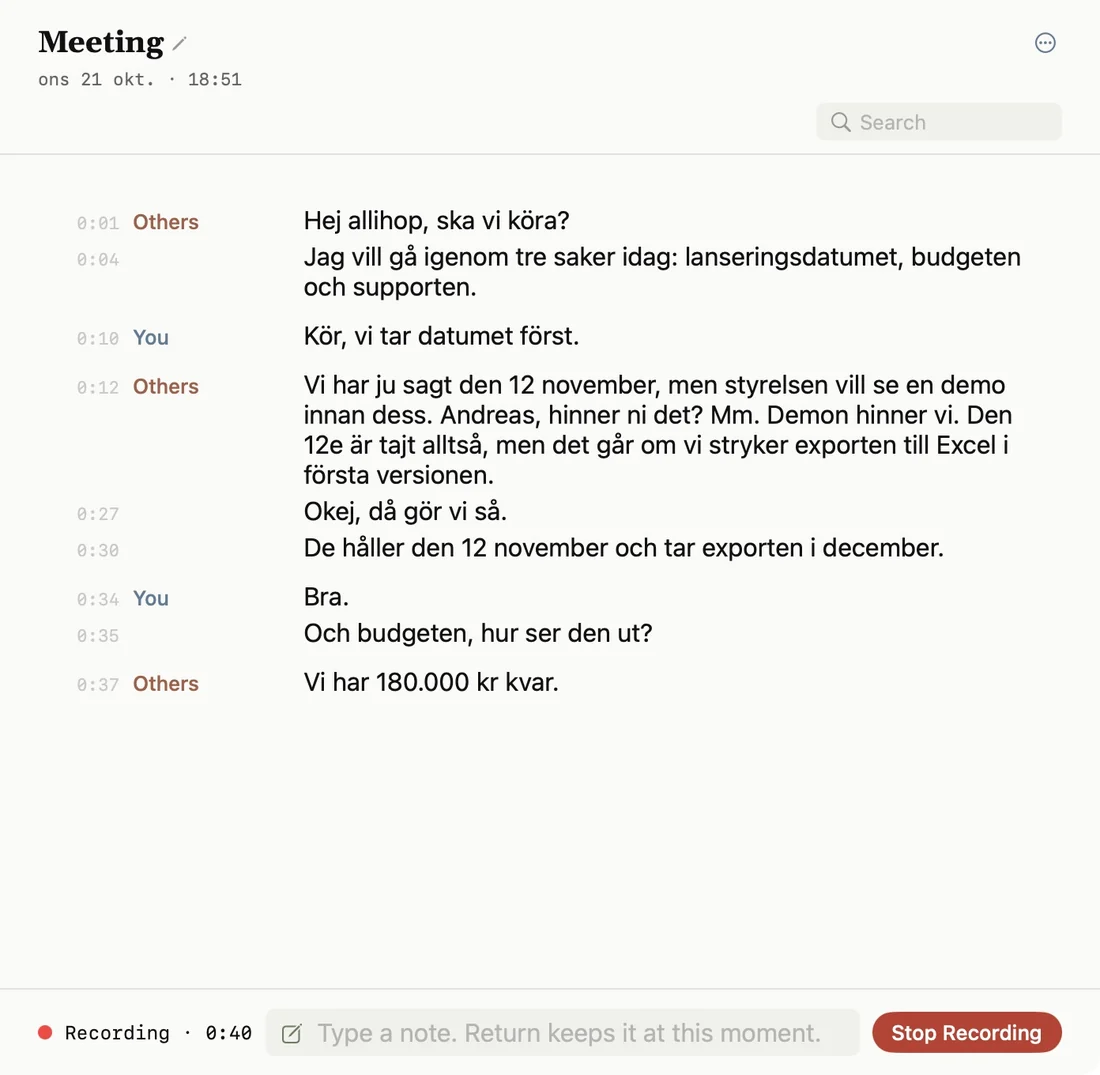
A real take in Sæga 1.3.1 of a made-up Swedish meeting. The voices are AI-generated.The mark listens to the same meeting: the inner ring is you, the middle ring the others.
How a meeting goes
- Start. Choose Record Meeting in the menu bar. Or let Sæga ask: when Teams, Zoom, Slack, Webex, FaceTime or a meeting in the browser starts using the microphone, Sæga shows “Record this meeting?”. Without your yes, nothing is recorded.
- Talk. The text appears as you talk, you and the others apart. A small panel shows that both sides are heard, and it stays out of your screen share.
- Finish. When the meeting ends, Sæga writes the text again more carefully and splits the others into Speaker 1, 2, 3 and so on (macOS 15). Click to name them.
What stays on your Mac
| What | Where |
|---|---|
| The recording, both tracks | On your Mac |
| The text, as you talk and afterwards | On your Mac |
| The speakers and voice recognition | On your Mac |
| Search, the calendar view, projects and Markdown copies | On your Mac |
| Notes: summary, decisions, action items and open questions | In the cloud, when you ask |
| The follow-up email | In the cloud, when you ask |
Only text goes to the cloud: the transcript, your own notes, the speakers' names and, if you let Sæga read your calendar, the meeting's title and the attendees' names. Sæga asks before anything is sent. In Local Mode nothing is sent, and there are no notes.
What it costs
Recording and transcription are free, with no cap. Notes from a meeting cost one AI text and a follow-up email one more. Free has 40 AI texts a month and Pro 1,000. See pricing.
Notes and order
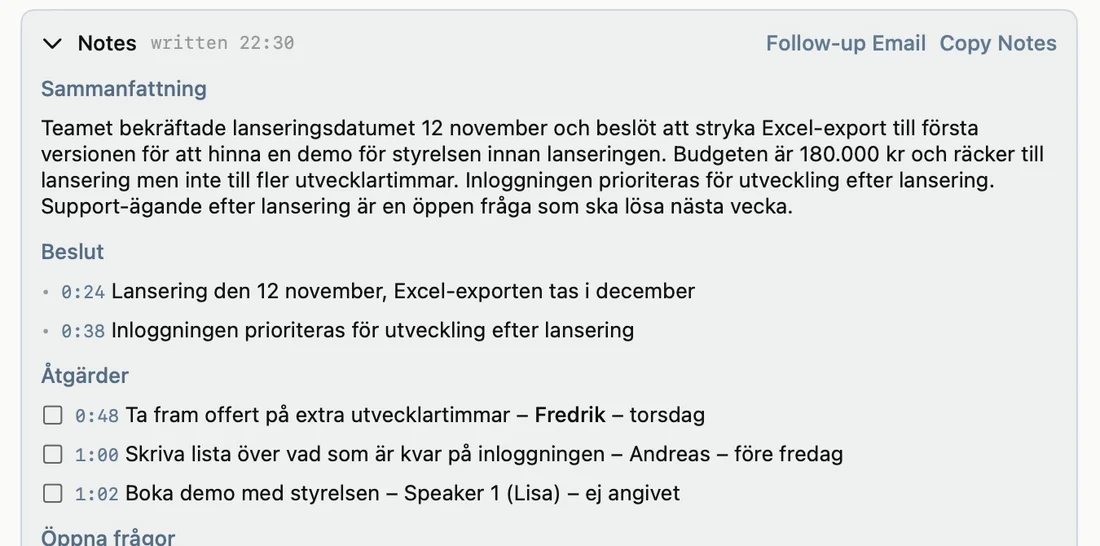
- Notes from a template: Standard, One-on-One, Customer Call, Stand-up or your own. Every point has a time you can click.
- What you jot during the meeting comes along word for word.
- A follow-up email from the notes, for you to check and send.
- Search every transcript, or browse a calendar with each recording on its day.
- Projects with their own colour. Sæga suggests the project, and what you promised lands in Sæga’s Notes, to tick off or send to Reminders.
- “Last time”: the last meeting's open questions and your promises, before the next one starts.
- Markdown copies per project in a folder you choose, for Obsidian for instance. A copy you edited is never overwritten.
The whole flow in 29 seconds: the meeting, the notes and a podcast turned into text. With sound. Real takes in Sæga 1.3 with a made-up Swedish meeting and English headlines. The voices are AI-generated.
What you need
- A Mac with Apple silicon and macOS 14.4 or later. Telling the others apart and recognising voices needs macOS 15.
- Two permissions: the microphone, and recording system audio. macOS does not ask for screen recording, and Sæga can't see your screen.
- One of twelve languages: Swedish, Norwegian, English, German, French, Spanish, Italian, Portuguese, Dutch, Polish, Ukrainian or Russian.
What is kept
The text is stored encrypted on your Mac. The sound is kept on your Mac, roughly 30 MB an hour, and you choose to keep it always, for 30 days or not at all. A voiceprint is kept only for a person you name and tick, encrypted, and is forgotten after a year without a meeting. Deleting a meeting removes both text and sound. More in the privacy policy.
Questions
Does it work with Teams, Zoom and Meet?
Yes. Sæga records what your Mac plays and what you say into the microphone, so it works with every call app, in the browser too. When Teams, Zoom, Slack, Webex, FaceTime or a meeting in the browser (Meet, for instance) starts using the microphone, Sæga asks whether to record it. Say no and nothing happens. No meeting bot joins the call. Needs macOS 14.4 or later.
What does recording meetings cost?
Recording and transcription are free, with no cap, because they happen on your Mac. What costs AI texts is what is written in the cloud: notes from a meeting are one AI text and a follow-up email one more. Free has 40 AI texts a month and Pro 1,000.
What goes to the cloud from a meeting?
Never the sound. When you ask for notes or a follow-up email, this text is sent: the transcript, your own notes and the speakers' names, plus the meeting's title and the attendees' names if you let Sæga read your calendar. Sæga asks before anything is sent. In Local Mode nothing is sent, and there are no notes.
How does Sæga know who is speaking?
Your microphone becomes You and your Mac's sound becomes Others, in two tracks that are never mixed. On macOS 15 or later Sæga also splits the others into Speaker 1, 2, 3 and so on, and you name them with a click. In the same room Sæga hears everyone through your microphone, so everyone is You.
Do I have to tell the others I am recording?
Yes, tell them before you start. Sæga reminds you the first time you record. Only save a voice for recognition if the person agreed.
And audio and video files
Already have a recording, an interview, a lecture or a podcast? Drop the file into Sæga and get its text with times, free and on your Mac. Save as text, Markdown or subtitles (.srt and .vtt).