
Free meeting transcription
Free meeting transcription, on your Mac
Sæga records and transcribes your meetings on your Mac, for free and with no meeting bot in the call. Your microphone and your Mac's sound become two tracks, you and the others, written apart as you talk. The sound never leaves your Mac.
Recording and transcription free, no limit · No meeting bot · Teams, Zoom, Meet and the rest
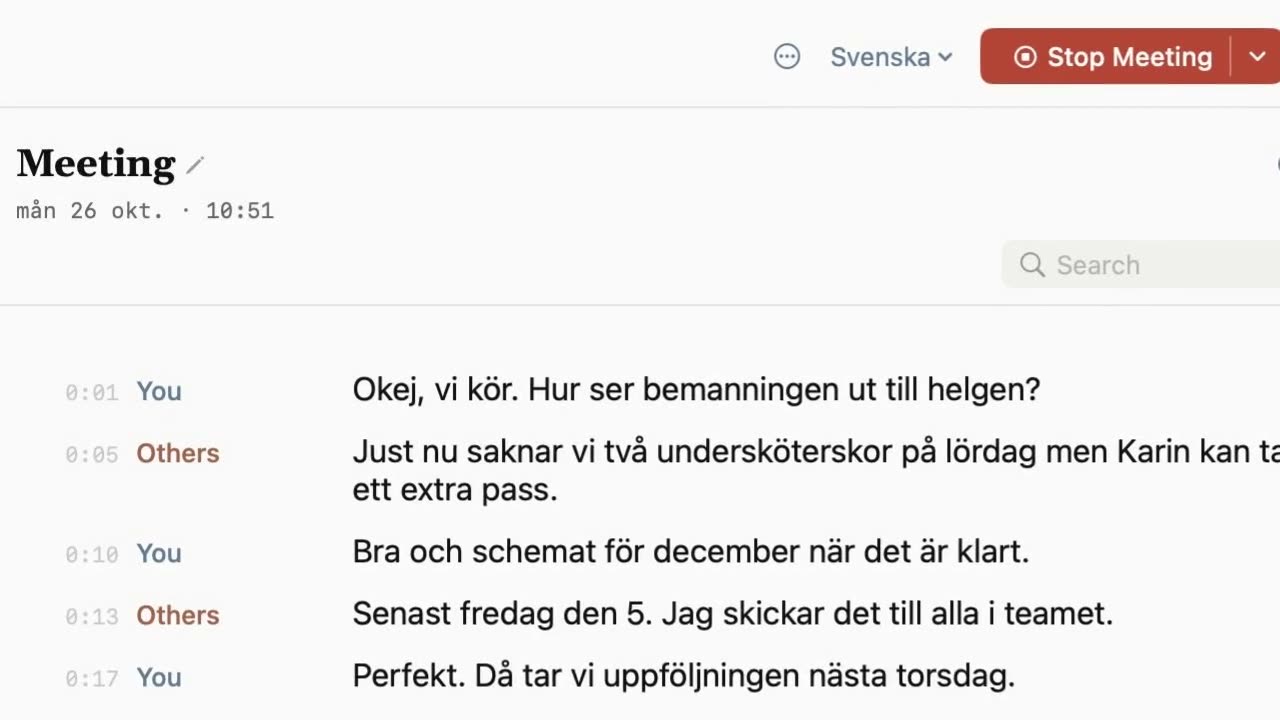
What you get for free
- Recording and transcription with no limit. No minutes to count, because the speech model runs on your Mac.
- No meeting bot. Nothing joins your call. Sæga listens to your microphone and to what your Mac plays.
- You and the others apart, as you talk. Your microphone is "You" and your Mac's sound is "Others", kept apart. When the meeting ends, Sæga writes the text again more carefully.
- Any call app. Sæga asks when a call starts in Zoom, Teams, Slack, Webex, Discord, FaceTime, WhatsApp, Telegram, Skype, Amazon Chime or in the browser (Google Meet, for instance). It never records unless you say yes.
- Speakers you can name. After the meeting, the others are split into Speaker 1, 2, 3. Click to name them (macOS 15).
- 12 languages: Swedish, Norwegian, English, German, French, Spanish, Italian, Portuguese, Dutch, Polish, Ukrainian and Russian. Built for Swedish first.
Notes when you ask for them
Sæga can write notes from the meeting: a summary, decisions, action items (what, who, when) and open questions, each with a time you can click. Notes are written in the cloud from the text, and the app asks first. They cost one AI text, and a follow-up email one more. Free has 40 AI texts a month. Pro is $29 once and gives 1,000 a month, plus custom modes for every app. Only text is sent, never the sound, and Local Mode turns notes off. See pricing, or the full pricing page (in Swedish).
Transcribe a Teams or Zoom meeting for free
- Start the call in Teams, Zoom, Meet or any other call app. Sæga asks "Record this meeting?". Or choose Record Meeting in the menu bar yourself.
- Talk. The text appears as you talk, you and the others apart. The panel stays out of your screen share.
- Stop. Choose Stop Meeting. Sæga writes the text again more carefully, and you can search it, export it or ask for notes.
Tell the others you are recording. Sæga reminds you the first time. More on how a meeting goes: Meetings in Sæga.
Transcribe audio to text on your Mac, for free
Already have a recording? Drop an audio or video file into Sæga and get its text with times, on your Mac. Formats: wav, mp3, m4a, aac, aiff, caf, flac, mpeg, opus, ogg, mp4, mov and m4v (not wma, mkv or webm). Export as text, Markdown or subtitles (.srt and .vtt). In a file, Sæga does not split speakers.
What you need
- A Mac with Apple silicon and macOS 14.4 or later. Telling the others apart and recognising voices needs macOS 15.
- Two permissions: the microphone, and recording system audio. macOS does not ask for screen recording, and Sæga can't see your screen.
Free options compared
Four ways to get a meeting into text on a Mac without paying. What each one's free tier gives, as its maker describes it.
| Voice Memos (macOS) | Otter Basic | Fathom Free | Sæga Free | |
|---|---|---|---|---|
| Transcription | Built in, as you record and afterwards | 300 minutes a month, 30 minutes per conversation | Unlimited recordings and transcriptions | No limit, on your Mac |
| Joins the call | Records the microphone; Apple's guide doesn't cover call audio | Joins Zoom, Teams and Meet to write and share notes | Bot, or bot-free capture (beta on Mac) | No bot. Your microphone and your Mac's sound |
| Audio files | Its own recordings | 3 imports in total, ever | Not stated on the pricing page | No limit, text with times and subtitles |
| AI notes | Not covered in Apple's transcript guide | Writes and shares notes from the call | Instant AI call summaries | On request: 40 AI texts a month |
| Where it runs | Mac (not in every country or region) | Cloud service. Mac, Windows, iOS, Android, Chrome | Cloud service | On your Mac. Apple silicon only |
Checked 2026-10-28 on the official pages: Apple Support, Voice Memos transcription · otter.ai/pricing · fathom.ai/pricing. Prices and limits change; tell us at support@saega.app if something here is out of date.
When another tool is the better choice
- You are on Windows, or want it on your phone too. Otter has apps for Mac, Windows, iOS and Android. Sæga is Mac only, Apple silicon only.
- Your team wants one shared place for every call. Otter shares notes from the call, and Fathom has team folders, comments and a team recordings view on its Team plan. Sæga keeps everything on your own Mac.
- You only record a voice note now and then. Voice Memos is already on your Mac and transcribes as you record.
- You want a meeting in text without minutes to count, and the sound kept on your Mac. That is what Sæga is for.
Questions
Is Sæga really free for meeting transcription?
Yes. Recording and transcription are free, with no limit, because they happen on your Mac. What costs AI texts is what is written in the cloud: notes from a meeting are one AI text and a follow-up email one more. Free has 40 AI texts a month. Pro is $29 once and gives 1,000 a month, plus custom modes for every app.
Does it work with Teams, Zoom and Google Meet?
Yes. Sæga records your microphone and what your Mac plays, so it works with every call app, in the browser too. When Zoom, Teams, Slack, Webex, FaceTime or a meeting in the browser starts a call, Sæga asks whether to record it. No meeting bot joins the call.
Does the audio leave my Mac?
No. The sound never leaves your Mac. When you ask for notes or a follow-up email, the text is sent: the transcript, your own notes and the speakers' names. Sæga asks first, and Local Mode sends nothing.
What do I need to run it?
A Mac with Apple silicon and macOS 14.4 or later. Splitting the others into speakers and recognising voices needs macOS 15. Sæga does not run on Windows, iPhone or Intel Macs.
Can I transcribe an audio file I already have?
Yes. Drop an audio or video file into Sæga and get its text with times, free and on your Mac. Export as text, Markdown or subtitles (.srt and .vtt).
How is it different from Otter or Fathom?
Otter and Fathom are cloud services that work on more platforms and are built for sharing with a team. Sæga transcribes on your Mac with no limit and no meeting bot, and the sound never leaves your Mac. It is for one person on one Mac.
Try it in your next call
Recording and transcription are free, with no limit. No account, no card.
Download Sæga for freeSend to MacmacOS 14.4 or later · Apple silicon · How meetings work