
Guide · Claude
Your meetings in Claude
Upload Sæga's files in a chat and you can ask Claude what you decided and who promised what.
In Sæga
- Settings → Recording → Meetings → Keep every transcript as a file. Turn it on and choose a folder. The picker opens in a folder your cloud already syncs, if you have one.
- Projects become folders. A meeting in a project goes in the project's folder, the rest in
Inbox. When a meeting changes project its file moves too, as long as you haven't edited it. - Name and project while the meeting runs. Click the name in the meeting panel to type a new one, and pick the project in the menu below it.
File transcripts (audio and video files you transcribe) go in the same folder. Only want one project's meetings: Edit Project → Keep a Markdown copy of each meeting in a folder.
To Claude
You don't need any sync. Choose an ordinary folder in Sæga and upload the files from there.
- Open a chat on claude.ai.
- Use the upload button to add files.
- Pick one or more
.mdfiles from Sæga's folder. - Ask your question.
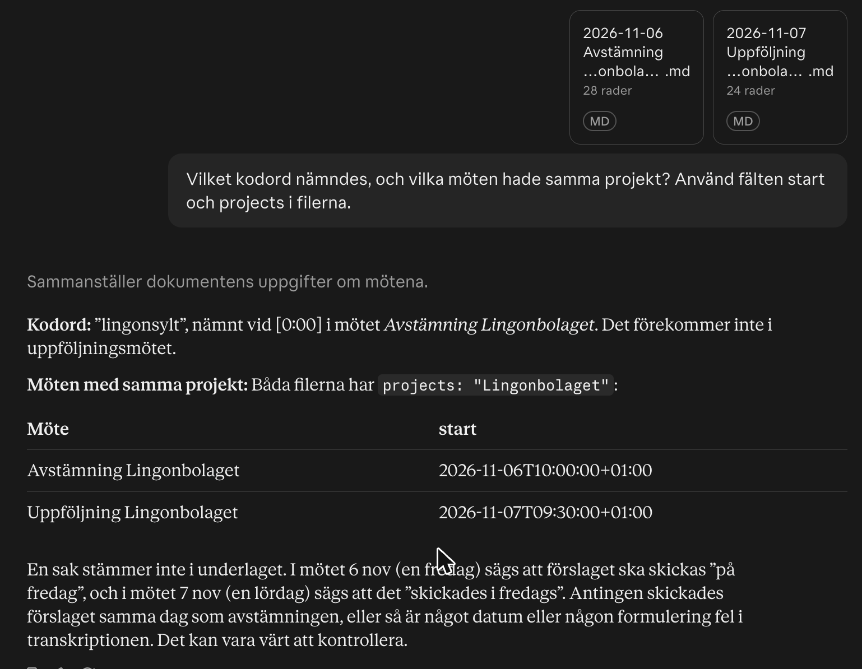
Claude read the projects and worked from the fields at the top of the file. Try for example:
What did I promise in the latest meeting with Lingonbolaget, and has anything happened since? Use the fields start and projects.
In Claude you can also add files to a project's knowledge. We haven't tried that.
What happens to your data
Sæga writes the files on your Mac and never uploads anything. Your own sync, the cloud folder you chose, like OneDrive or iCloud Drive, takes them on, and from there that service's terms apply. The files are not encrypted like Sæga's own transcripts, so anyone who can open the folder can read them. The audio never goes with them.
When you delete a meeting in Sæga, it asks whether the file should go too. A file you have edited always stays.
Common questions
Do I need to put the folder in the cloud?
No. You upload the files from an ordinary folder on your Mac. What you upload then goes to Claude and follows Anthropic's terms.
Can I upload several meetings at once?
Yes. We uploaded two meetings in the same question and got the right answer.