
Comparison
A free Granola alternative for personal use
Granola and Sæga both record a meeting without a bot in the call. Granola writes AI notes, with apps on many devices and folders you can share. Sæga is a Mac app for one person: it transcribes on your Mac, for free, and keeps your meetings there.
Short answer. Pick Sæga if you want your own meetings in text on your Mac, free and with no history window. Pick Granola if you want notes on your phone and watch too, or a team that shares folders and works in Slack.
What Granola's free plan gives you
Granola Basic is free. It includes AI meeting notes, bot-free capture from your device's audio, speaker tagging, note templates, shared folders and a Slack integration, with apps for desktop, iOS, Android and Apple Watch. Meeting history is limited to 30 days. Granola Business costs $14 per user a month and adds unlimited history, follow-up emails and integrations such as Notion, Zapier and HubSpot.
What Sæga does differently
- Transcription on your Mac. Recording and transcription are free, with no limit. The sound never leaves your Mac.
- No history window. The text is stored encrypted on your Mac, and a meeting stays until you delete it.
- You and the others apart, as you talk. Your microphone is "You" and your Mac's sound is "Others". After the meeting the others are split into Speaker 1, 2, 3 (macOS 15).
- Notes and a follow-up email when you ask. A summary, decisions, action items and open questions, each with a time you can click. Notes cost one AI text and the follow-up email one more: 40 a month on Free, 1,000 with Pro.
- Audio and video files too. Drop a file and get its text with times, then export as text, Markdown or subtitles.
- Markdown copies for your notes app. Per project, in a folder you choose (Obsidian, for instance). A copy you edited is never overwritten.
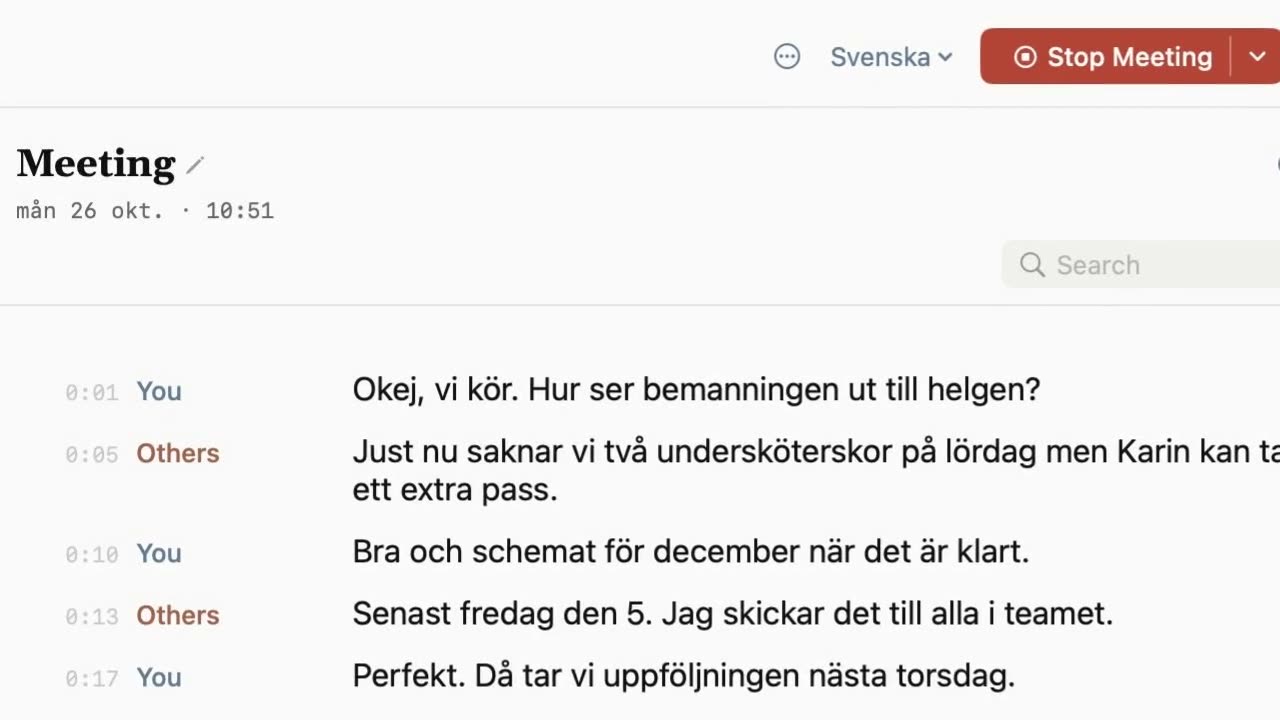
Side by side
| Granola | Sæga | |
|---|---|---|
| In the call | Bot-free, device-audio capture | No bot. Your microphone and your Mac's sound |
| Meeting history, free | 30 days | On your Mac until you delete it |
| AI notes, free | Included | On request: 40 AI texts a month |
| Follow-up email | Business plan | On request, one AI text |
| Where it transcribes | Not stated on the pricing page. Audio deleted after transcription | On your Mac. The sound never leaves it |
| Sharing | Shared folders, Slack | Export, and Markdown copies in a folder you choose |
| Platforms | Desktop, iOS, Android, Apple Watch | Mac with Apple silicon, macOS 14.4 or later |
| Paid plan | Business $14 per user a month | Pro $29 once, 1,000 AI texts a month |
Granola's plans checked 2026-10-28 on granola.ai/pricing. Prices change; tell us at support@saega.app if something here is out of date. Sæga's pricing: Pricing.
Where Granola is the better choice
- You want your notes on every device. Granola has apps for desktop, iOS, Android and Apple Watch. Sæga is Mac only, and only on Apple silicon.
- Your team works in shared folders and Slack. Granola includes both on the free plan, and Business adds integrations such as Notion, Zapier and HubSpot. Sæga keeps your meetings on your own Mac.
- You want AI notes without counting. Granola's free plan includes AI meeting notes. In Sæga, each set of notes is one AI text out of 40 a month on Free.
Where Sæga is the better choice
- You want to keep your meetings. No 30-day window: the text stays on your Mac until you delete it.
- The sound should never leave your Mac. Transcription runs on your Mac, and only text goes to the cloud when you ask for notes. Local Mode sends nothing.
- Personal use, paid once. Recording and transcription are free. Pro is $29 once, with 1,000 AI texts a month and custom modes for every app, not a monthly fee per user.
- Swedish and Norwegian. Sæga is built for Swedish first, in 12 languages in all.
Is Sæga open source?
No. If open source is a must, Sæga is not the answer, and there are open-source meeting recorders worth a look. What Sæga offers instead is a signed and notarized Mac app where recording and transcription run on your Mac, for free.
Questions
Is Sæga a free Granola alternative?
Yes, for one person on a Mac. Recording and transcription are free, with no limit. Notes from a meeting cost one AI text: Free has 40 a month, and Pro is $29 once for 1,000 a month.
Does Sæga need a meeting bot?
No. Like Granola, Sæga records without a bot. It takes your microphone as You and your Mac's sound as Others, so it works with Zoom, Teams, Meet and every other call app.
How long does Sæga keep my meetings?
There is no history window. The text is stored encrypted on your Mac until you delete the meeting. The sound is kept on your Mac too, and you choose to keep it always, for 30 days or not at all.
Is Sæga open source?
No. Sæga is a closed-source Mac app. Recording and transcription run on your Mac and are free.
Does Sæga have a phone app?
No. Sæga needs a Mac with Apple silicon and macOS 14.4 or later. If you want your notes on iOS, Android or Apple Watch, Granola is the better choice.
Try it in your next call
Recording and transcription are free, with no limit. No account, no card.
Download Sæga for freeSend to MacmacOS 14.4 or later · Apple silicon · How meetings work · Free options compared