
Comparison
A free Otter alternative that stays on your Mac
Otter is a cloud service that works almost everywhere and is built for sharing. Sæga is a Mac app that transcribes your meetings on the Mac itself, with no minute limit and no meeting bot. They suit different people, so here is the honest version.
Short answer. Pick Sæga if you are on a Mac and want meetings in text without counting minutes, with the sound kept on your Mac. Pick Otter if you need Windows, Android or the browser, or a team that shares every call in one place.
What Otter's free plan gives you
Otter Basic is free and includes 300 transcription minutes a month per user, at most 30 minutes per conversation, and 3 file imports per user for the life of the account. It joins Zoom, Microsoft Teams and Google Meet to write and share notes. Otter Pro costs $16.99 per user a month, or $8.33 a month billed annually.
For a weekly check-in that is plenty. For a day of hour-long calls, the 30 minutes per conversation is the limit you will meet first.
What Sæga does differently
- No minute limit. Recording and transcription are free, with no limit, because the speech model runs on your Mac.
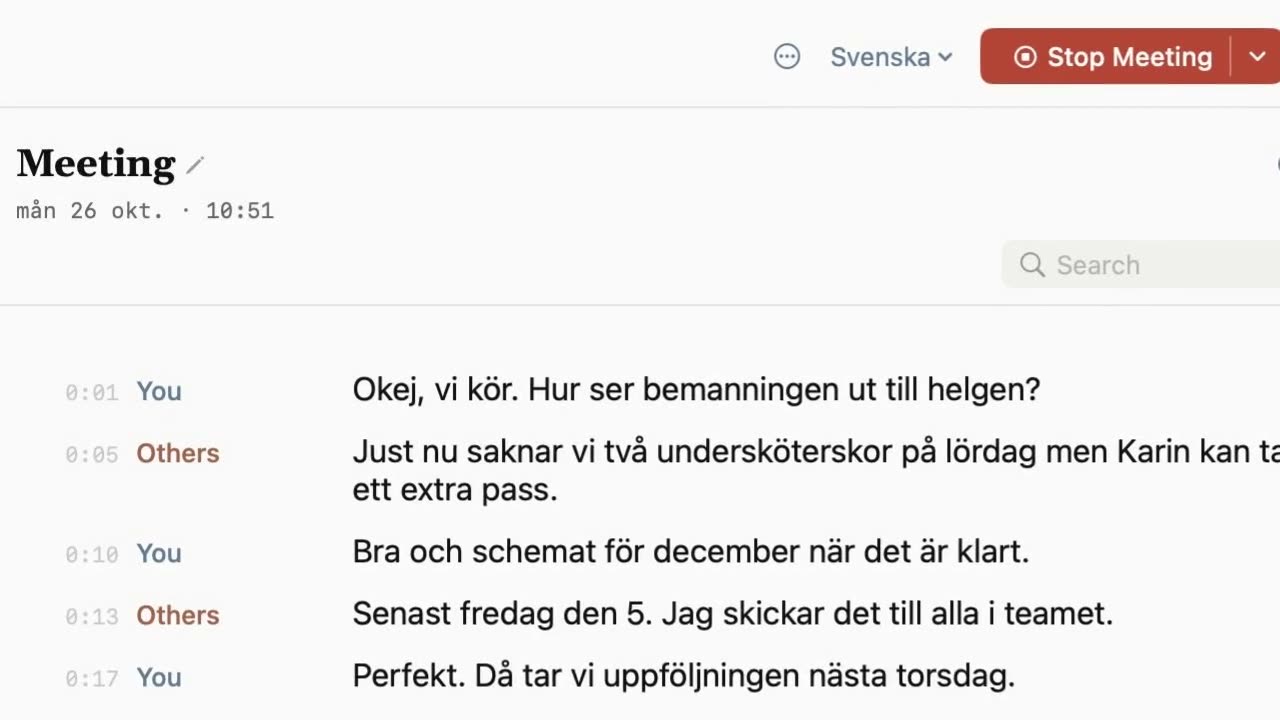
- No meeting bot. Nothing joins your call. Your microphone is "You" and your Mac's sound is "Others", written apart as you talk.
- The sound never leaves your Mac. The text is stored encrypted on your Mac. Notes are written in the cloud from the text, only when you ask, and the app asks first.
- Files with no import limit. Drop an audio or video file and get its text with times. Export as text, Markdown or subtitles (.srt and .vtt).
- Built for Swedish, in 12 languages in all.
Side by side
| Otter | Sæga | |
|---|---|---|
| Free transcription | 300 minutes a month per user | No limit |
| Longest conversation, free | 30 minutes | No cap. Tested with three-hour meetings |
| File imports, free | 3 in total, ever | No limit |
| History, free | The 25 most recent conversations | On your Mac until you delete it |
| In the call | Joins Zoom, Teams and Meet | No bot. Your microphone and your Mac's sound |
| Where the audio goes | Otter's cloud service | Stays on your Mac |
| Platforms | Mac, Windows, iOS, Android | Mac with Apple silicon, macOS 14.4 or later |
| AI notes | Writes and shares notes from the call | On request: 40 AI texts a month free, 1,000 with Pro |
| Paid plan | Pro $16.99 a month, or $8.33 a month billed annually | Pro $29 once |
Otter's plans and limits checked 2026-10-28 on otter.ai/pricing. Prices change; tell us at support@saega.app if something here is out of date. Sæga's pricing: Pricing.
Where Otter is the better choice
- You are not only on a Mac. Otter has apps for Mac, Windows, iOS and Android. Sæga is Mac only, and only on Apple silicon.
- Your team shares calls. Otter writes and shares notes from the call. Sæga keeps your meetings on your own Mac, for you.
- You record on your phone. Otter has apps for iOS and Android. Sæga has no phone app.
Where Sæga is the better choice
- Long or many meetings. No minutes to count and no cap per conversation.
- Sensitive conversations. The sound never leaves your Mac, and no bot shows up in the participant list.
- Swedish and Norwegian. Sæga is built for Swedish first, in 12 languages in all.
- You prefer to pay once. Pro is $29 once (1,000 AI texts a month and custom modes for every app), and recording and transcription stay free without it.
Questions
Is Sæga a free Otter alternative?
Yes, for meeting transcription on a Mac. Recording and transcription are free, with no limit, because they happen on your Mac. Notes from a meeting cost one AI text: Free has 40 a month, and Pro is $29 once for 1,000 a month.
Does Sæga join my meetings like a bot?
No. Nothing joins your call. Sæga records your microphone as You and your Mac's sound as Others, so it works with Zoom, Teams, Meet and every other call app. It never records unless you say yes.
Does Sæga work on Windows or iPhone?
No. Sæga needs a Mac with Apple silicon and macOS 14.4 or later. If you need Windows, Android or a browser, Otter is the better choice.
Can I import my old recordings?
Yes. Drop an audio or video file into Sæga and get its text with times, on your Mac and with no import limit. Formats include wav, mp3, m4a, flac, mp4 and mov.
Can Sæga tell speakers apart like Otter?
In a call, Sæga keeps you and the others apart as you talk. After the meeting it splits the others into Speaker 1, 2, 3, and you name them with a click. That needs macOS 15. In a file, Sæga does not split speakers.
Try it in your next call
Recording and transcription are free, with no limit. No account, no card.
Download Sæga for freeSend to MacmacOS 14.4 or later · Apple silicon · How meetings work · Free options compared